Καλώς ήρθες στο forum! Για να συμμετάσχεις στις συζητήσεις πρέπει να εγγραφείς στην πύλη. Γίνε μέλος τώρα!
EMAIL: Πλαστά μηνύματα Ηλεκτρονικού Ταχυδρομείου (Hoaxes - Chain) |
|
|
HowTo, Tutorials, Οδηγίες, Συμβουλές |
| Συγγραφέας |
EMAIL: Πλαστά μηνύματα Ηλεκτρονικού Ταχυδρομείου (Hoaxes - Chain) |
| |
|

inertia
Ανεμοδαρμένος

Dec 14, 2003
5131
|
|
Κάτι ακόμη που εντόπισα, και ίσως είναι πολύ χρήσιμες πληροφορίες να έχουμε στα υπόψιν!!
(είναι στα Αγγλικά, αλλά όποιος θέλει να βοηθήσει να τις μεταφράσουμε, ώστε να υπάρχουν συνοπτικά ως reference κι εδώ, είναι παραπάνω από καλοδεχούμενο!!)
Παράθεση:
Tips to Avoid Spam
Listed below are a number of suggestions that can help prevent your email address from becoming a target to spammers.
 Do not post your e-mail address in an unobfuscated form on the Internet. If you need to post your e-mail address, obfuscate it so it cannot be easily harvested such as “name –at- hotmail – dot- com,” Or if you need to include your e-mail address in your signature, include a small graphic image containing your e-mail address. Do not post your e-mail address in an unobfuscated form on the Internet. If you need to post your e-mail address, obfuscate it so it cannot be easily harvested such as “name –at- hotmail – dot- com,” Or if you need to include your e-mail address in your signature, include a small graphic image containing your e-mail address.
Check to see if your e-mail address is visible to spammers by typing it into a Web search engine such as www.google.com. If your e-mail address is posted to any Web sites or newsgroups, remove it if possible to help reduce how much spam you receive.
Lots of ISPs provide free e-mail addresses. Set up two e-mail addresses, one for personal e-mail to friends and colleagues, and use the other for subscribing to newsletters or posting on forums and other public locations. If you have a more complex e-mail address, it is less likely to receive spam than one that could be easily dictionary-attacked.
Many ISPs also offer free spam filtering. If this is available, enable it. Report missed spam to your ISP, as it helps reduce how much spam you and other members of the same ISP receive. If your ISP does not offer spam filtering, use anti-spam software to reduce the amount of spam delivered to your inbox.
When replying to newsgroup postings, do not include your e-mail address.
When filling in Web forms, check the site's privacy policy to ensure it will not be sold or passed on to other companies. There may be a checkbox to opt out of third party mailings. Consider opting out to receive less opt-in e-mail.
Never respond to spam. If you reply, even to request removing your e-mail address from the mailing list, you are confirming that your e-mail address is valid and the spam has been successfully delivered to your inbox, not filtered by a spam filter, that you opened the message, read the contents, and responded to the spammer. Lists of confirmed e-mail addresses are more valuable to spammers than unconfirmed lists, and they are frequently bought and sold by spammers.
Do not open spam messages wherever possible. Frequently spam messages include "Web beacons" enabling the spammer to determine how many, or which e-mail addresses have received and opened the message. Or use an e-mail client that does not automatically load remote graphic images, such as the most recent versions of Microsoft® Outlook® and Mozilla Thunderbird.
Do not click on the links in spam messages, including unsubscribe links. These frequently contain a code that identifies the e-mail address of the recipient, and can confirm the spam has been delivered and that you responded.
Never buy any goods from spammers. The spammers rely on very small percentages of people responding to spam and buying goods. If spamming becomes unprofitable and takes lots of effort for little return, spammers have less incentive to continue spamming. Would you risk giving your credit card details to an unknown, unreputable source?
If you have an e-mail address that receives a very large amount of spam, consider replacing it with a new address and informing your contacts of the new address. Once you are on lots of spammers' mailing lists, it is likely that the address will receive more and more spam.
Make sure that your anti-virus software is up to date. Many viruses and Trojans scan the hard disk for e-mail addresses to send spam and viruses. Avoid spamming your colleagues by keeping your anti-virus software up to date.
Use the firewall included with your operating system, or use a firewall from a reputable company, to avoid your computer being hacked or infected with a worm and used as a spam-sending zombie.
Do not respond to e-mail requests to validate or confirm any of your account details. Your bank, credit card company, eBay, Paypal, etc., already have your account details, so would not need you to validate them. If you are unsure if a request for personal information from a company is legitimate, contact the company directly or type the Web site URL directly into your browser. Do not click on the links in the e-mail, as they may be fake links to phishing Web sites.
Do not click on unusual links. Confirm the sender did send the e-mail if it looks suspicious.
Never give out your login details to anyone.
IT departments should train their users not to give out sensitive information. |
πηγή: http://mcafee.com/us/threat_center/anti_spam/spam_tips.html
και το Top-10 των τίτλων emails που είναι spam!
Παράθεση:
Top 10 Spam Subject Lines
Spam campaigns can change rapidly so any spam, or missed spam, you receive in your inbox may not necessarily correspond with the spam subjects in this list, as these subjects may be blocked by your anti-spam software if installed.
Updated Last: Dec 23, 2008
1. Contact Me
2. Salary too low for you? you can buy Degree/Dip1oma/MasteerMBA
3. Order status
4. Delivery Status Notification
5. Message
6. Delivery Status Notification (Failure)
7. lets get naked
8. Your order
9. Relax and take your time.
10. Conto sospeso temporaneo
|
πηγή: http://mcafee.com/us/threat_center/anti_spam/spam_top10.html
Έγινε επεξεργασία από τον/την inertia στις Δευ, 05 Ιαν 2009 12:07 pm, 1 φορά |
|
|
|
| |
|

Legend-x
Γκουρού

Aug 26, 2008
895
Τόπος: Ρόδος
|
|
Η το άλλο το τρελό βέβαια εμφανίζεται στο windows live messanger plus αλλά εγώ το αναφέρω
ΥΠΟΛΟΓΙΣΕ ΤΗΝ ΗΛΙΚΙΑ ΤΟΥ ΜΥΑΛΟΥ ΣΟΥ
|
|
|
|
| |
|

e3iswsi
Γκουρού
May 07, 2009
1672
Τόπος: βιβλίο μαθηματικών
|
|
Παράθεση:
Αν λάβεις ένα mail με τίτλο 'Ο Σαβούρης' σβήστε το ΑΜΕΣΩΣ και μην το ανοίξεις.
Πραγματικά, αυτός εδώ είναι τελείως σαβούρης. Όχι μόνο θα σβήσει ό,τι βρει στο σκληρό δίσκο, αλλά θα σβήνει και τους σκληρούς σε ακτίνα 5 μέτρων από τον υπολογιστή. Ο ιός απομαγνητίζει ΚΑΙ τις πιστωτικές σου κάρτες.
Επαναπρογραμματίζει τον κωδικό πρόσβασης στα ΑΤΜ των τραπεζών, αλλάζει τις ρυθμίσεις του Video και χρησιμοποιεί αρμονικές συχνότητες για να γρατζουνίσει όποιο cd πας να παίξεις. Ρυθμίζει το τηλέφωνο να καλεί αυτόματα μόνο σε 090.
Θα σου ξαναγράψει όλα τα αντίγραφα ασφαλείας, αλλάζοντας όλα τα ενεργητικά ρήματα σε παθητική φωνή και χώνοντας απροσδιόριστα ορθογραφικά λάθη που θα αλλάξουν τελείως το νόημα των προτάσεων.
ΘΑ ΣΟΥ ΤΡΑΒΑΕΙ ΤΟ ΚΑΖΑΝΑΚΙ ΕΝΩ ΚΑΝΕΙΣ ΝΤΟΥΣ!
Αν ο 'Σαβούρης' ανοίξει σε περιβάλλον Windows 98/Me θα αφήσει το κάθισμα της λεκάνης ανοιχτό και το σεσουάρ επικίνδυνα κοντά στη γεμάτη μπανιέρα. Θα επηρεάσει τις κουβέρτες και τα μαξιλάρια αλλά το χειρότερο είναι πως ύπουλα θα αντικαταστήσει το άπαχο γάλα με πλήρες.
Θα σου πιει όλες τις μπύρες!
Θα αφήσει βρώμικα σώβρακα στο τραπεζάκι του καθιστικού όταν θα περιμένεις κόσμο. Θα αλλάξει το σαμπουάν με αφρό και τον αφρό με ξίδι.
Θα σε βάλει να τρέχεις μ' ένα ψαλίδι και να πετάς πράγματα, με τέτοιο τρόπο που μόνο αστείος μπορεί να είσαι, μέχρι να βγάλεις το μάτι κάποιου.
ΠΡΟΕΙΔΟΠΟΙΗΣΕ ΟΣΟ ΠΕΡΙΣΣΟΤΕΡΟΥΣ ΜΠΟΡΕΙΣ!
Αν δε στείλεις το μήνυμα αυτό σε 5000 άτομα μέσα σε 20 δευτερόλεπτα, θα κλάσεις τόσο δυνατά που το δεξί σου πόδι θα σπάσει και θα πετάξει κομμάτια με τόση ορμή που θα τραυματίσουν το πιο κοντινό σου άτομο.
|
|
|
|
|
| |
|
e3iswsi
Γκουρού
May 07, 2009
1672
Τόπος: βιβλίο μαθηματικών
|
|
Παράθεση:
SUPER TEST!!!!
Ακολουθήσε προσεκτικά της οδηγίες αλλιώς το αποτέλεσμα δεν θα αντιπροσωπεύει την αλήθεια.
Ποιο είναι το αγαπημένο σας φρούτο:
Πορτοκάλι
Μήλο
Καρπούζι
Φράουλα
ΑΠΟΤΕΛΕΣΜΑ:
Αν επιλέξατε το ΠΟΡΤΟΚΑΛΙ: είστε άτομο που του αρέσουν τα πορτοκάλια
Αν επιλέξατε το ΜΗΛΟ: είστε άτομο που του αρέσουν τα μήλα
Αν επιλέξατε το ΚΑΡΠΟΥΖΙ: είστε άτομο που του αρέσουν τα καρπούζια
Αν επιλέξατε τη ΦΡΑΟΥΛΑ: είστε άτομο που του αρέσουν οι φράουλες
Τι νόμιζες?
Ε?
Ότι τα φρούτα σε ένα email θα σου έλεγαν ποιος σε αγαπάει ή τι άνθρωπος είσαι??
Αυτό το μήνυμα είναι κρίκος μιας αλυσίδας..
Αν όμως δεν το στείλεις,
η ζωή σου θα παραμείνει ίδια.
Μα τι νόμιζες??
Ότι στέλνοντας αυτό το email σε 10 άτομα
αύριο θα παντρευτείς??
Ή ότι αν δεν τη στείλεις
θα είσαι δυστυχισμένος για όλη σου τη ζωή?
Σοβαρέψου!!!!
Δεν έχει προχωρήσει τόσο πολύ η τεχνολογία ώστε να μπορεί ένα email να σου αλλάξει τη ζωή.
Στείλε λοιπόν αυτό το email στους φίλους σου με την ελπίδα να σταματήσουν να στέλνουν ή να πιστεύουν ηλίθια email!
Σε πόσους? Και πού ξέρω εγώ πόσους φίλους έχεις?!
Αντίο λοιπόν!!
Και καλή τύχη στη ζωή σου!!
(Την ίδια τύχη θα είχες είτε σ' το έλεγα εγώ είτε όχι.)
 |
|
|
|
|
| |
|
e3iswsi
Γκουρού
May 07, 2009
1672
Τόπος: βιβλίο μαθηματικών
|
|
Έγινε επεξεργασία από τον/την e3iswsi στις Δευ, 08 Ιούν 2015 1:42 pm, 2 φορές συνολικά |
|
|
|
| |
|
|
|
Έχει πλάκα πόσους έπεισε αυτό το e-mail address που έχει...
|
|
|
|
| |
|
|
|
Λοιπόν, παραδεχτείτε το: πόσοι βγήκατε πριν λίγες μέρες έξω την νύχτα και ψάχνατε το "δεύτερο φεγγάρι;" 
|
|
|
|
| |
|
inertia
Ανεμοδαρμένος
Dec 14, 2003
5131
|
|
Προσέξαμε ένα αρκετά ενδιαφέρον δημοσίευμα σχετικά με "Facebook: Σελίδες και εφαρμογές απάτη!" στο gr@2.0 blog...
Φαίνεται πως η λογική του "μπείτε και προσκαλέστε κι άλλους χίλιους-δεκατρείς (sic) φίλους σας" καλά κρατεί, διοχετεύοντας σε νέα κανάλια την ίδια chain-mail λογική, κάτι σαν pattern συμπεριφοράς.
Επίσης, αυτό αναφέρεται κι ως Scam / Confidence trick, που π.χ. μπορείτε να δείτε περισσότερα κι εδώ: http://en.wikipedia.org/wiki/Confidence_trick
Παραθέτω όλο το περιεχόμενο του ενδιαφέροντος δημοσιεύματος για να υπάρχει ως αναλυτική πηγή-reference, ενώ υπάρχουν κι άλλα post στο εν λόγω blog για να ρίξετε μια ματιά!
Παράθεση:
Facebook: Σελίδες και εφαρμογές απάτη!
Η επιτυχία που σημείωσε η ανάρτηση “Απάτη: Δες ποιος βλέπει το προφίλ σου στο Facebook” δείχνει ξεκάθαρα την ανάγκη που έχουν οι χρήστες για πληροφόρηση γύρω από σελίδες και εφαρμογές που υπόσχονται “λαγούς με πετραχήλια”! Δυστυχώς μια ανάρτηση με όλες αυτές τις απάτες δεν είναι δυνατή μιας και αυτές ανανεώνονται συνεχώς, βρίσκοντας νέους και ευρηματικούς τρόπους να αποκτούν γρήγορα “θαυμαστές” - “χρήστες”.
Στην προηγούμενη ανάρτηση επί του θέματος είχα μαντέψει κάποιους από τους λόγους που οι δημιουργοί αυτών των σελίδων μπαίνουν στο κόπο. Τελευταία παρατηρώ ότι αυτές οι σελίδες δημιουργούνται από χρήστες με εταιρικό προφίλ δηλαδή ανώνυμους χρήστες (αλλά όχι πάντα) και στον “τοίχο” τους θα βρείτε πολλούς συνδέσμους προς σελίδες εντός και εκτός Facebook, με άλλα λόγια διαφημίσεις! Δεν φτάνει που μας λένε ψέμματα, βγάζουν και λεφτά! Υπάρχουν και αυτοί που το κάνουν απλά και μόνο επειδή δεν έχουν κάτι καλύτερο να κάνουν.
Κλασσικά πλέον παραδείγματα είναι οι σελίδες του τύπου “Δες ποιος βλέπει το προφίλ σου και τις φωτογραφίες σου”, “Γύρισε στο παλιό Facebook”, “Δείτε όλα τα κανάλια της Nova” “Gold Facebook account” ενώ άλλες αφορούν γνωστά παιχνίδια όπως το “Farmville” και το “Mafia Wars”! Μια σελίδα στο Facebook (★ ★ ★ Project NOSCAM ★ ★ ★) προσπαθεί να καταγράψει και να δημιουργήσει ένα κατάλογο με όλες τις σελίδες απάτη. Δεν είναι η μόνη...
Κάποιες σελίδες θα σας δώσουν αυτό που υπόσχονται και μια τακτική του στυλ “είναι όλα απάτη” κάνει κακό στο ίδιο το Facebook, το Facebook μας αρέσει και μας εξυπηρετεί άρα το θέλουμε καθαρό από απάτες. Πρέπει να καταλάβουμε ότι μόνο δρώντας συλλογικά και κάνοντας “αναφορά” (report) στις σελίδες-απάτη μπορούμε να συμβάλουμε καθοριστικά. Διαβάστε παρακάτω για να μάθετε πώς γίνετε αυτό.
_______
Πώς λοιπόν θα αναγνωρίζουμε την απάτη από το αληθινό;
Σελίδα
* Σε οποιαδήποτε μηχανή αναζήτησης (Google, Yahoo!, Bing) ψάξτε για την δυνατότητα που υπόσχεται να σας προσφέρει η σελίδα στο Facebook και δείτε τουλάχιστον όλη την πρώτη σελίδα των αποτελεσμάτων της αναζήτησης. Πολλοί χρήστες μπαίνουν στο κόπο να γράψουν για αυτές τις απάτες εν τη γενέσει τους. Αν οι υπηρεσίες που υπόσχονται είναι αληθινές το πιο πιθανό είναι να βρείτε τον τρόπο να τις αποκτήσετε χωρίς να καλέσετε κανένα “φίλο” σας, το έχω κάνει!
* Συνήθως ο χώρος για τα σχόλια είναι κλειστός ή περνάει από λογοκρισία (όταν οι δημιουργοί της σελίδας είναι τόσο άσχετοι που δεν ξέρουν ούτε πώς να προστατέψουν την ίδια τους την απάτη) ώστε να μην μαθαίνουν οι νέοι χρήστες από τους ήδη εξαπατημένους. Ψάξτε τα σχόλια των “θαυμαστών” αν υπάρχουν και ίσως πάρετε μια απάντηση.
* Υπόσχονται δυνατότητες που δεν προσφέρονται σαν επιλογή από τους ίδιους τους δημιουργούς. Αν ήθελε το Facebook θα μας επέτρεπε να γνωρίζουμε ποιοι είδαν το προφίλ μας όπως κάνουν άλλα κοινωνικά δίκτυα (social networks).
* Μεγάλη μερίδα αυτών των σελίδων έχει τρομερά ορθογραφικά λάθη ακόμα και στον τίτλο!

Εφαρμογές
Τελευταία λαμβάνω ειδοποιήσεις ότι ένας "φίλος" μου σχολίασε ανάρτηση, φωτογραφία, βίντεο ή κάτι άλλο δικό μου μέσω κάποιας εφαρμογής του Facebook, μπαίνοντας εκεί για να δω το σχόλιο αυτόματα έστειλα και εγώ χωρίς να το θέλω/επιλέξω ειδοποιήσεις σε πολλούς φίλους μου ότι και εγώ σχολίασα κάτι δικό τους ενώ στην πραγματικότητα δεν έκανα τίποτα άλλο από το να επιτρέψω στην εφαρμογή να "τρέξει". Το ίδιο υποθέτω θα κάνουν και αυτοί και πάει λέγοντας! Η ειδοποίηση που έλαβα αφορούσε μια φωτογραφία αλλά αντί να την δω οδηγήθηκα σε μια άλλη εφαρμογή την "Angel or Devil". Άλλη μια είναι το "Lucky Number".
_______
Προστασία από τις σελίδες και εφαρμογές απάτη
Σελίδα
* Μήνυμα στο τοίχο μας ώστε να ενημερώσουμε τους “φίλους” μας. Αν είστε ήδη θαυμαστής της σελίδας μπορείτε να βάλετε το όνομα της ως εξής: π.χ. “@Δες ποιος βλέπει....” και διαλέξτε το όνομα της σελίδας από το μενού που ανοίγει. Έτσι το μήνυμα μας θα φαίνεται στον τοίχο μας και στον τοίχο της σελίδας.
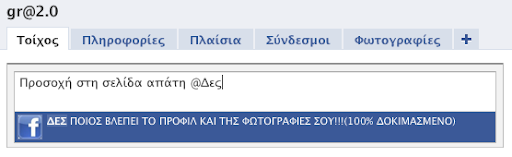
* Αφαίρεση από τους “θαυμαστές” αν κάναμε το λάθος και τους πιστέψαμε.
* Αναφορά της σελίδας/ομάδας ως “Πλαστή σελίδα” ή “Διαφήμιση/Ενοχλητική αλληλογραφία” (για τις ομάδες) γράφοντας και μια πρόταση στα αγγλικά εξηγώντας τους λόγους αναφοράς.
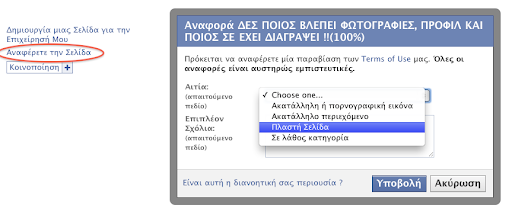
Εφαρμογές
* Μήνυμα στο τοίχο μας ώστε να ενημερώσουμε τους “φίλους” μας. Αν είστε ήδη θαυμαστής της εφαρμογής (όχι μόνο χρήστης) μπορείτε να βάλετε το όνομα της όπως αναφέρθηκε παραπάνω.
* Αναφορά της εφαρμογής, συνήθως ο σύνδεσμος βρίσκεται τέρμα κάτω στην οθόνη κάθε εφαρμογής.
* Διαγραφή εφαρμογής: Από το "Λογαριασμό" σας επιλέξτε "Ρυθμίσεις Εφαρμογών" και μετά κλικ στο X.

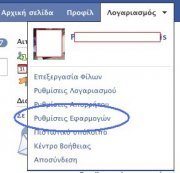
|
|
|
|
|
| |
|
inertia
Ανεμοδαρμένος
Dec 14, 2003
5131
|
|
Κάτι ακόμη, αν και τα περισσότερα είναι ήδη γνώριμα σε αρκετούς....
(Σημείωση: προέρχεται από σελίδα της Microsoft, οπότε θα δείτε αρκετές αναφορές προς προϊόντα της εταιρίας να υπάρχουν μες στο κείμενο. Το σημαντικό είναι οι βασικοί κανόνες-αρχές που μπορούμε να εκμαιεύσουμε μέσα από αυτό!)
Στη σελίδα \'Microsoft Online Safety\' η εταιρεία αναφέροντας έγραψε:
How to handle suspicious e-mail
There are good reasons to be suspicious of e-mail.
Some e-mail messages might be phishing scams, some might carry viruses. Images in spam e-mail might turn out to be pornographic, or to include Web beacons, which can be adapted to secretly send a message back to the sender.
Follow these guidelines to help protect yourself when suspicious mail shows up in your Inbox.
1. If you receive a phishing e-mail message, do not respond to it. Don't open junk mail at all
- If an e-mail looks suspicious, don't risk your personal information by responding to it.
- Delete junk e-mail messages without opening them. Sometimes even opening spam can alert spammers or put an unprotected computer at risk.
- Don't reply to e-mail unless you're certain that the message comes from a legitimate source. This includes not responding to messages that offer an option to "Remove me from your list."
- Do not "unsubscribe" unless the mail is from a known or trusted sender.
- Use the junk mail tools in your e-mail program. For example, Windows Live Hotmail gives you the option to unsubscribe from mail that you previously had trusted or requested. This sends a notice back to the sender to have you removed from their list, while at the same time automatically adding the sender to your block list.
2. Approach links in e-mail messages with caution
Links in phishing e-mail messages often take you to phony sites that encourage you to transmit personal or financial information to con artists. Avoid clicking a link in an e-mail message unless you are sure of the real target address, or URL.
Before you click a link, make sure to read the target address. If the e-mail message appears to come from your bank, but the target address is just a meaningless series of numbers, do not click the link.
Make sure that the spelling of words in the link matches what you expect. Fraudsters often use URLs with typos in them that are easy to overlook, such as "micosoft."
3. Approach images in e-mail with caution
Just as a lighthouse beacon beams a message with light, pictures in e-mail messages—also called "Web beacons"—can be adapted to secretly send a message back to the sender.
Spammers rely on information returned by these images to locate active e-mail addresses. Images can also contain harmful code and can be used to deliver a spammer's message in spite of filters.
The best defense against Web beacons is to prevent pictures from downloading until you've had a chance to review the message.
Both Windows Live Hotmail and Microsoft Outlook 2007 are preset to do this automatically for e-mail from addresses not in your address book.
4. Approach attachments in e-mail messages with caution
Attachments might be viruses or spyware that download to your machine when you open the attachment file. If you don't know who the attachment is from or if you weren't expecting it, don't open it.
5. Don't trust the sender information in an e-mail message
Even if the e-mail message appears to come from a sender that you know and trust, use the same precautions that you would use with any other e-mail message.
Fraudsters can easily spoof the identity information in an e-mail message.
6. Don't trust offers that seem too good to be true
If a deal or offer in an e-mail message looks too good to be true, it probably is. Exercise your common sense when you read and respond to e-mail messages.
7. Report suspicious e-mail
If you receive a suspicious e-mail that looks like it came from a company that you know and trust, report the e-mail to the faked or "spoofed" organization.
Contact the organization directly-not through the e-mail you received-and ask for confirmation. Or call the organization's toll-free number and speak to a customer service representative. Report the e-mail to the proper authorities, including the FBI, the Federal Trade Commission (FTC), and the Anti-Phishing Working Group.
8. Don't enter personal or financial information into pop-up windows
One common phishing technique is to launch a fake pop-up window when someone clicks a link in a phishing e-mail message. To make the pop-up window look more convincing, it might be displayed over a window you trust. Even if the pop-up window looks official or claims to be secure, avoid entering sensitive information, because there is no way to check the security certificate. Close pop-up windows by clicking the red X in the top right corner (a "Cancel" button may not work as you'd expect).
9. Don't forward chain e-mail messages
Not only do you lose control over who sees your e-mail address, but you also may be furthering a hoax or aiding in the delivery of a virus.
Plus, there are reports that spammers start chain letters expressly to gather e-mail addresses. If you don't know whether a message is a hoax or not, a site like Snopes can help you separate fact from fiction.
10. Update your computer software
At Microsoft, we continue to make improvements to our software to help protect your computer. Visit Microsoft Update to scan your computer and install any high-priority updates that are offered to you.
____
πηγή: \'Microsoft Online Safety\'
|
|
|
|
|
| |
|
e3iswsi
Γκουρού
May 07, 2009
1672
Τόπος: βιβλίο μαθηματικών
|
|
inertia έγραψε:
εχμ... αν και λίγο καθυστερημένα, μάλλον είναι ενδιαφέρον να αναφερθεί, έτσι για το story του θέματος... 
Παράθεση:
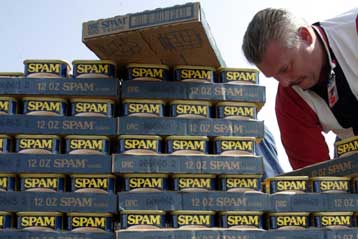
Τριάντα χρόνια συμπληρώνονται από την εμφάνιση του spam
Θλιβερή επέτειος - Ο όρος spam προήλθε από την ομώνυμη κονσέρβα κρέατος
|
|
Εγώ παλιά νόμιζα ότι τα spam λέγονται έτσι επειδή μας τη σπάν'
|
|
|
|
Σχετικές συζητήσεις - topics
Πρόσφατες συζητήσεις - topics
|
| | |
 ΣΗΜΕΙΩΣΗ: Ο ιστότοπος βρίσκεται σε λειτουργία μόνο για ανάγνωση. Το περιεχόμενο αποτελεί αρχειοθετημένο αντίγραφο αυτού το οποίο και εμπλουτίζεται για λόγους διάσωσης και διατήρησης αρχείου.